
The Games company contacted NetResolve on a recommendation from another company we did work with before on a similar project. They wanted to setup a gaming website based in Gibraltar and needed robust infrastructure to run this on.
Three areas we normally consider in the design of this type of infrastructure are
The approach here was to first understand the as in-depth as possible the needs of the platform. We started with getting technical reports on what their existing platform was running on. We used this as a base then extrapolated based on what the projected take up of the platform was. Based on what we found we came up with a hardware proposal and refined this with the in-house technical lead at the games company.
The final solution was a storage cluster with Dell storage, Dell switches and Dell servers. A VMware hypervisor was selected as we felt this would provide the most robust platform to run on. We also selected Veeam software for backups. See figure below.
Also after discussions with their financial team they preferred to go for a leasing option. We worked with our preferred hardware partner Storm technologies to broker the leasing deal with Dell.
ImplementationAll the kit was delivered to Netresolve. We did the complete build on site before shipping it off to Gibraltar. We provided detailed documentation of the IT hosting company in Gibraltar to be able to re-assemble the kit.
Once the hardware was up, remote access was given to The games company to add virtual machines and test the environment’s performance. During the implementation we used a Trello Board to keep track of the work progress between NetResolve and the Games company.
A VPN was also needed between this environment at AWS, as some test servers were held in AWS.
Any Issues arisingThe biggest part of this project was distilling the right fit of hardware and software. When all the pieces were in place the build and testing, and implementation phases went very smoothly
Go LiveAfter all the infrastructure was in place on site the Games company tested for a couple months before going live. There were no issues when the site went live.

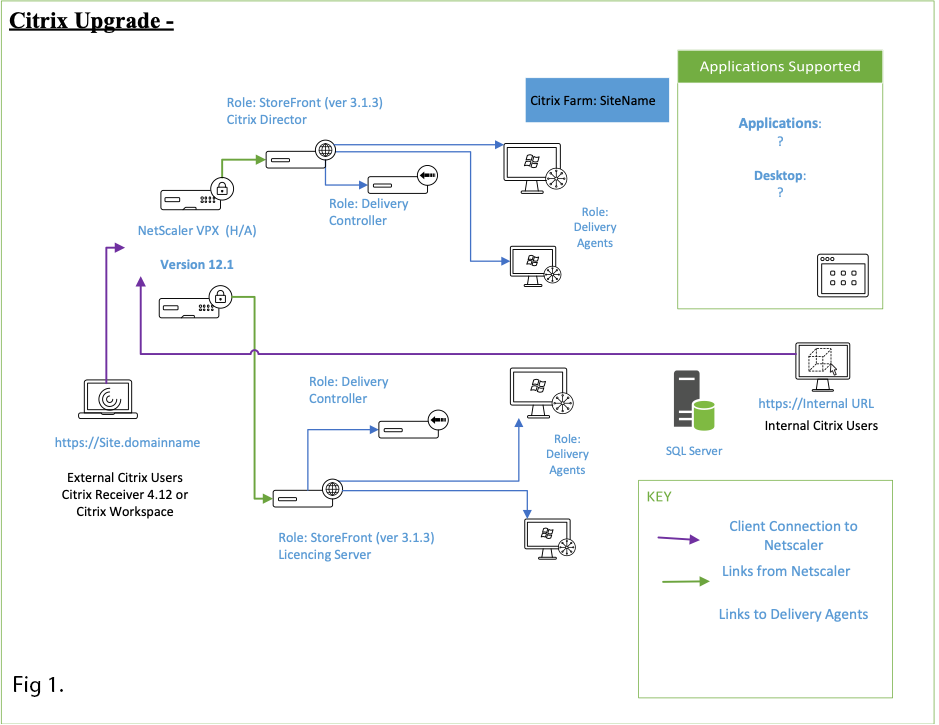
With Windows 2008R2 end of life approaching the It team at the Royal Horticultural Society embarked on the mammoth task of upgrading their IT infrastructure. Part of this upgrade was to upgrade the Citrix environment from XenApp Citrix 6.5 to the Citrix XenApp 1811.
After consultation with Netresolve the approach to this upgrade was as follows:
All Citrix servers were going to be setup within the RHS WAN. The decision was made to adopt a classic Citrix Environment, with Delivery Controller, Licensing and Storefront on the internal WAN, together with the workload servers. Redundancy was a key aspect of the solution. The Studio, Storefront and Delivery Agent elements all needed had redundancy built-in.
 Implementation
The solution was first built in a testing environment. Once built full end to end testing was done with a small group of users.
This highlighted user work preferences, and allowed changed to be made to the user desktop environment to allow users to have access to the areas they use most. Smaller details like have a search function in outlook were picked up in this test phase.
The Citrix Netscaler VPX also needed to up upgraded as part of this process. This was done in iterations with testing at each step as this Netscaler was used for the wider organization and not just Citrix.
Documentation was also completed in the testing phase and used to rebuild the live environment.
Any Issues arisingSpecial applications to be published proved tricky. Again, having a distinct testing phase allowed time to get this right before go live.
Go LiveUser documentation was provided. All remote users went live on Citrix with no major issues. Users used a mix of Citrix Workspace client and direct Web browser access.
DecommissioningAfter the system was live for 2 weeks, decommissioned the old Citrix freeing up resources in the client’s infrastructure.

With this group of Solicitors up-time, availability and speed of access means everything. As part of extending their office space they needed to connect an additional core switch to their infrastructure with near zero impact to the exiting users.
Their IT manager approached NetResolve for assistance in achieving this goal. Having had worked with Brick Court in the past when they had issues with their core switch, we had some insight into their network.
Specified the next generation Cisco Switch that would be compatible with their existing equipment and the necessary connectors needed. Worked with the IT manager to plan the changes needed and the time windows this could be completed.
The SolutionProvided a diagram with the proposed changes and modules used.

Prepared in advance the VLAN configuration and the connector configurations. Planned the work for a Friday night when there would be almost no users on the network.
ImplementationConnected and configured the old and new Cisco Switches. Tested the connections between the two. Downtime was restricted to the time it took to connect the switches.
Cruse Bereavement Care, approached us to provide a more redundant backup solution. They already had Veeam in place backing up their virtual systems to an onsite nas. As Cruse is a charity, we made use of the available not for profit credit scheme offered by Microsoft for Azure.
We Setup a cloud based storage Blob (12tb). This blob was then added to the onsite Veeam backup software. and was configured as a Scale out Backup repository. This means that Veeam would keep the most recent backup copies onsite and then offload the older backup files to the cloud.

In 2012 London hosted the Summer Olympics. Syneos Health , the Chandler Chicco Companies wanted a remote access solution for users. With the expected bulge in population and load on the public transport system, allowing more users remote access was imperative.
Discussed he requirements with the IT manager. They wanted to ensure most users could work remotely over that time and wanted the ability to scale up and scale back the platform on short notice. They already had a Citrix platform in place but this was used for their finance applications. They wanted an independent solution that wold give users essentially a windows 7 desktop.
The SolutionThe decision was to go for a Windows 2008R2 based RDS solution
This was designed to support 50 remote workers at Chandler Chicco. This solution was designed to be hosted on their existing VMware platform. The solution needed to be highly redundant and capable of balancing the load for heavy or light usage.
ImplementationWith the hardware already in place in site servers were built for host (application) servers, a broker server for balancing the connections and a web frontend server for user logins. A new A record was created for remote access and firewall changes made to allow secure access to the site.
Issues arisingUser profiles. A great deal of care was taken to ensure all user profiles were picked up in the Terminal service environment. Ensuring all drive mappings were in place to ensure the user experience was the same when connecting remotely.
Go LiveThe system was ready to go live well before the summer Olympics kicked off. Super Saturday thankfully had very little remote users connected, by the system was used close to capacity during the other Olympic days.
